Google Cloud TTS
ใช้ Google Cloud Text-to-Speech ที่รองรับ Chirp3-HD voices คุณภาพสูง พร้อมปรับ speed และ pitch ได้ ไฟล์ MP3 จะถูก cache ในเครื่องเพื่อลดการเรียก API ซ้ำ
ทำอะไรได้
- TTS คุณภาพสูง รองรับเสียง Chirp3-HD หลายภาษา (รวมไทย)
- ปรับ speakingRate และ pitch ได้
- เลือก voice ได้หลากหลาย เช่น
th-TH-Chirp3-HD-Despina - Cache ไฟล์ MP3 อัตโนมัติ (ฝั่งเซิร์ฟเวอร์) เพื่อไม่ต้องสังเคราะห์เสียงซ้ำ
เข้าถึงได้จาก
Settings → Connections → Google Cloud TTS (ใส่ API key) + Settings → TTS Voice (เลือก voice)
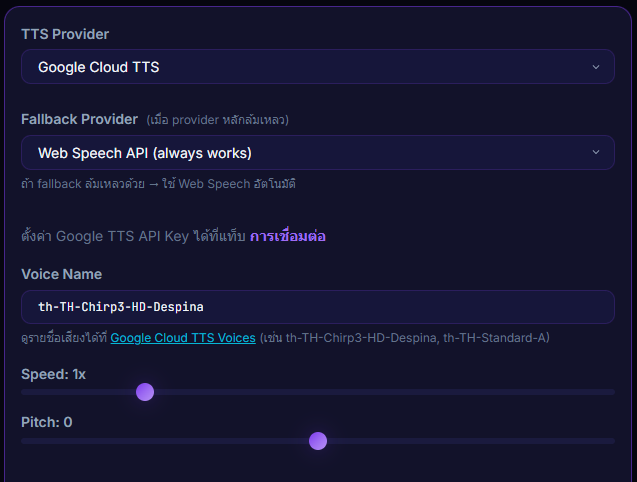
Inputs / ตั้งค่าได้
- Google API Key
- Voice name เช่น
th-TH-Chirp3-HD-Despina - speakingRate — ความเร็วการอ่าน
- pitch — ระดับเสียงสูง/ต่ำ
Outputs / สิ่งที่จะเกิดขึ้น
- ไฟล์ MP3 ถูก cache อัตโนมัติฝั่งเซิร์ฟเวอร์
- เสียง TTS เล่นบน overlay / TTS ระหว่างเล่น donation
Use case
streamer ที่อยากได้คุณภาพเสียงไทยที่เป็นธรรมชาติกว่า Web Speech — เปิด billing บน Google Cloud Console สร้าง API key แล้วเลือก Chirp3-HD voice ก็ได้เสียงระดับ premium ด้วยค่าใช้จ่ายต่อโดเนทเพียงเศษสตางค์