TTS Provider Selection
Pick a primary TTS provider with an automatic fallback — if the primary fails, the system switches to your fallback right away. If the fallback also fails, it falls back to the browser's Web Speech API as a last resort.
What it does
- Pick a primary provider from 4 options: Web Speech, Google, OpenAI, Gemini
- Set a fallback provider for when the primary fails
- System automatically falls back to Web Speech API when both fail
- Every donation that passes filters is read by the selected provider
Where to find it
Settings → TTS Voice tab
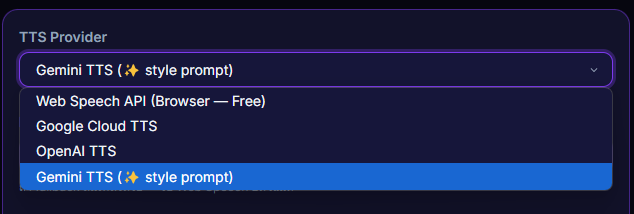
Inputs / configurable settings
- Primary provider —
webspeech/google/openai/gemini - Fallback provider — used when the primary fails
Outputs / what happens
- Every donation that passes filters is read by the selected provider
- If the primary fails → use fallback → use Web Speech
Use case
Run Gemini as primary for the great voice quality + auto-tone, but set Google Cloud TTS as fallback in case Gemini's quota runs out or the network goes down — your stream's TTS keeps going without missing a beat.