Google Cloud TTS
Use Google Cloud Text-to-Speech with high-quality Chirp3-HD voices, including speed and pitch controls. MP3 files are cached locally to cut down on repeat API calls.
What it does
- High-quality TTS with Chirp3-HD voices in many languages (including Thai)
- Adjustable speakingRate and pitch
- Wide voice selection, e.g.
th-TH-Chirp3-HD-Despina - Auto-caches MP3 files (server-side) to avoid re-synthesizing the same text
Where to find it
Settings → Connections → Google Cloud TTS (paste API key) + Settings → TTS Voice (pick voice)
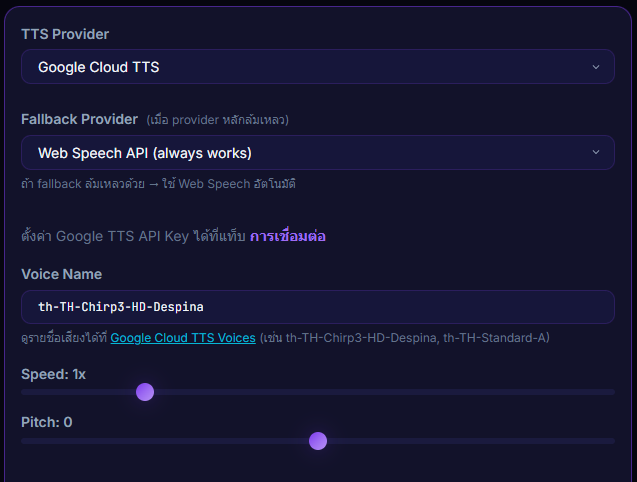
Inputs / configurable settings
- Google API Key
- Voice name e.g.
th-TH-Chirp3-HD-Despina - speakingRate — reading speed
- pitch — high/low pitch
Outputs / what happens
- MP3 files are auto-cached server-side
- TTS audio plays through the overlay / TTS while donations play
Use case
A streamer who wants a more natural Thai voice than Web Speech — turn on billing in Google Cloud Console, create an API key, pick a Chirp3-HD voice, and you get premium-tier audio for fractions of a cent per donation.