OBS Browser Source URL (Fullscreen / Compact)
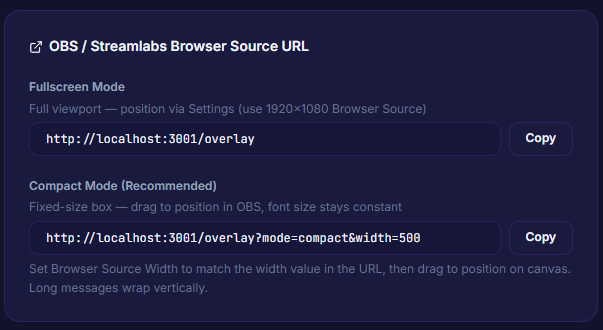
Generate URLs for OBS Browser Source in two modes — Fullscreen for a 1920×1080 overlay you position from the app, or Compact so you can drag the overlay anywhere in OBS yourself.
What it does
- Fullscreen mode (1920×1080) — position from the app's Settings
- Compact mode (fixed-size box) — drag freely in OBS
- Copy button for pasting the URL into OBS Browser Source
- URLs include query params (
mode=compact&width=500)
Where to find it
Settings → Overlay → OBS Browser Source URL (Copy button)
Outputs / what happens
- URL with query params like
?mode=compact&width=500 - Drop straight into an OBS Browser Source
Use case
Streamers still getting comfortable with OBS canvas — Compact mode lets you drag the overlay anywhere in your scene. Streamers who want a full-frame overlay with smooth animations use Fullscreen mode for max visual fidelity.