Word Blacklist Filter
Filter inappropriate words before they reach TTS — censor anything in your blacklist and skip empty messages, keeping your stream's vibe clean.
What it does
- Add / remove words in the blacklist one at a time
- Censor banned words before they hit TTS
- Skip empty messages automatically
- One toggle to enable / disable the entire filter
Where to find it
Settings → Filters tab
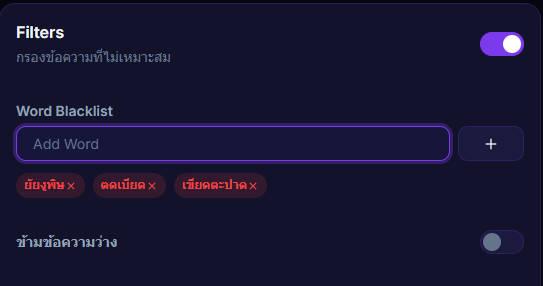
Inputs / configurable settings
- Blacklist word list — add / remove one at a time
- Skip empty messages toggle
- Filter on / off
Outputs / what happens
- Messages containing blacklisted words get censored before TTS reads them
- Empty messages are skipped
Use case
If your audience occasionally drops slurs or spam through donation messages — add those words to the blacklist once, and the system will censor them before TTS reads them aloud, keeping your stream's reputation intact.